


SnapShot
SnapShot is a simple program that captures a part of the screen and then keeps it visible in a top most window. SnapShot is excellent when working with multiple applications and trying to verify or manually copy data between programs.
For example, suppose you're trying to compare the data in two different programs. You could try to arrange the two programs so the data is visible in both or you could manually switch back and forwards comparing data.
With SnapShot, you draw a box around the piece of information your interested in, and SnapShot makes it appear in a little window that appears in front of all other programs. You can then easily compare the data without switching back and forth!
Free Download: SnapShot11Setup.exe
Installing SnapShot
To install SnapShot simply click on the installation program shown above and follow the directions.
Using SnapShot
Once installed, SnapShot will appear as a new icon in your Start Menu, under programs.
To use SnapShot:
- Make sure the information you want to capture is visible on screen.
- Click on the SnapShot icon in the Start menu.
- Your mouse cursor will turn to a cross hair.
- Click and drag to draw a box around the information of interest.
- SnapShot will display the information in a window.
- Switch to the other application, and the captured information will stay visible.
- When finished, simply close SnapShot like you would any other application.
What's New in 1.1
Build 101:
- Zooming support (via mouse-wheel, +/- keys and context menu).
- Scrolling support (via scrollbars, arrow keys and click+drag inside viewer)
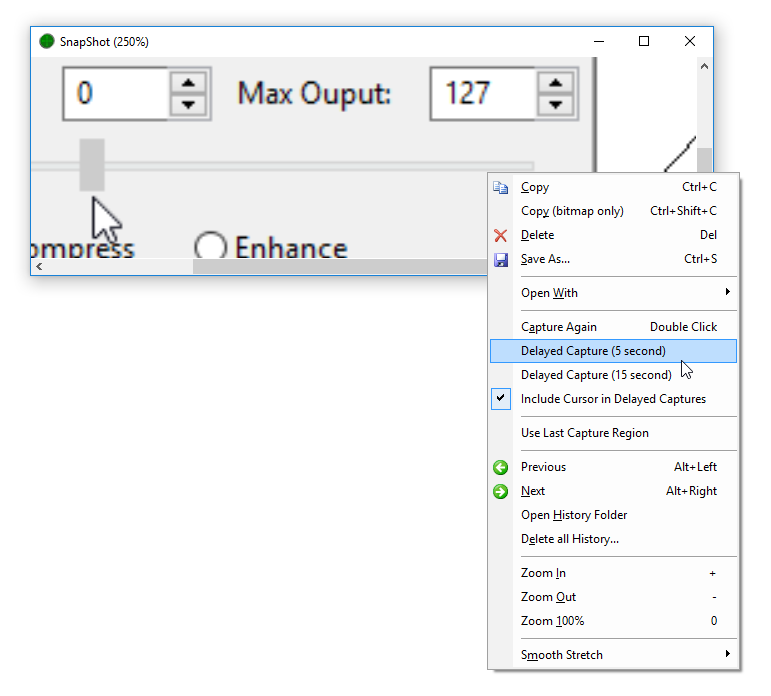
- New right click context menu.
- New Copy command copies captured image to clipboard
- New Save command saves captured image to a file (bmp, gif, jpeg, png or tiff formats supported)
- New history feature automatically keeps the previous 100 (configurable) captured images. Use Alt+Left/Right to move between previously saved images. See below for information on customizing the history.
- Fix to allow capturing of top-most windows (eg: task manager)
- Change single click in viewer window to start a new capture, to double click.
- When running a new capture (double click or Capture Again command), the viewer window is automatically hidden.
Build 102 (12th Feb 2010)
- Support for delayed captures (right click on SnapShot window and choose delayed capture)
- Copy command not copies file location as text (as well as image)
- Open History Folder command now selects the currently displayed image.
- New icon
Build 103
- Bug fixes
Build 104 (26 Oct 2011)
- Support for multiple monitors
- New Copy Bitmap Only command to copy the bitmap without the filename. (Eg: for paste into MSN)
Adjusting SnapShot's History Settings
SnapShot keeps the previous 100 captured images in folder under "My Documents" called "My SnapShot Images". To use a different folder, or the adjust the number of images kept requires editing the system registry.
- Click the Window Start button and select the Run command
- Type regedit and press enter.
- Navigate the tree on the left had side and locate the key HKEY_CURRENT_USER\Software\Topten Software\SnapShot\Settings
- Create a new string value called "HistoryFolder" by right clicking in the right hand side and selecting New -> String Value.
- Set the value to the location to the name of the folder to store history images in.
- Create a new DWORD value called "MaxHistory" and set it to the maximum number of previous images to keep.
Archive Folder
The latest version of SnapShot (build 107+) supports archiving old snapshots instead of simply deleting them. To enable this feature
- Click the Window Start button and select the Run command
- Type regedit and press enter.
- Navigate the tree on the left had side and locate the key HKEY_CURRENT_USER\Software\Topten Software\SnapShot\Settings
- Create a new string value called "ArchiveFolder" by right clicking in the right hand side and selecting New -> String Value.
- Set the value to the location where old SnapShot images should be copied to. The value can be a relative path from the history folder, or an absolute path.
Tips
- You can run SnapShot multiple times at once to capture separate pieces of information.
- For quick access, try placing a short cut to SnapShot in the QuickLaunch toolbar - that way it will only be a single click away!